
Architecture documentation that stays attached to the model
Architecture documentation often exists, but it is still hard to use.
There is a system diagram in one place, service documentation in another, a sequence diagram somewhere in a wiki, and an ER diagram in a database tool. Then an architectural review raises a deceptively simple question:
Which endpoint and internal component actually handle this interaction?
At that point, people reconstruct the answer from memory, browser tabs, and source code.
I have spent more than fifteen years in software engineering and about a decade working with system design. I have used whiteboards, documentation platforms, UML tools, C4 tooling, and diagram-as-code workflows. None of these tools is inherently bad. But I repeatedly ran into the same gap: the architectural model, the explanation, and the interaction flow were separate artifacts.
So I built a small tool to explore a different approach: use a C4 model as the navigation layer, and attach the surrounding knowledge to the model itself.
The result is Viaduct: a browser-based editor where a system model can contain Markdown documentation, PlantUML sequence diagrams, ER diagrams, API endpoint details, and relationships that can be traced across levels.
This is not a claim that one tool can replace every architecture practice. It is a practical attempt to reduce the distance between a diagram and the information required to act on it.
Everything described on this page is in the browser edition, which is free with an account: all four levels, documentation, sequences, ER schemas, Magic flows, change sets and the hosted MCP server, at €0 a month. The one paid part is Viaduct Desktop, the app you run on your own machine: free for 7 days, then €10 a month.
The model is the entry point
The editor follows the familiar four C4 levels:
- System Context — the system boundary, users, and external dependencies.
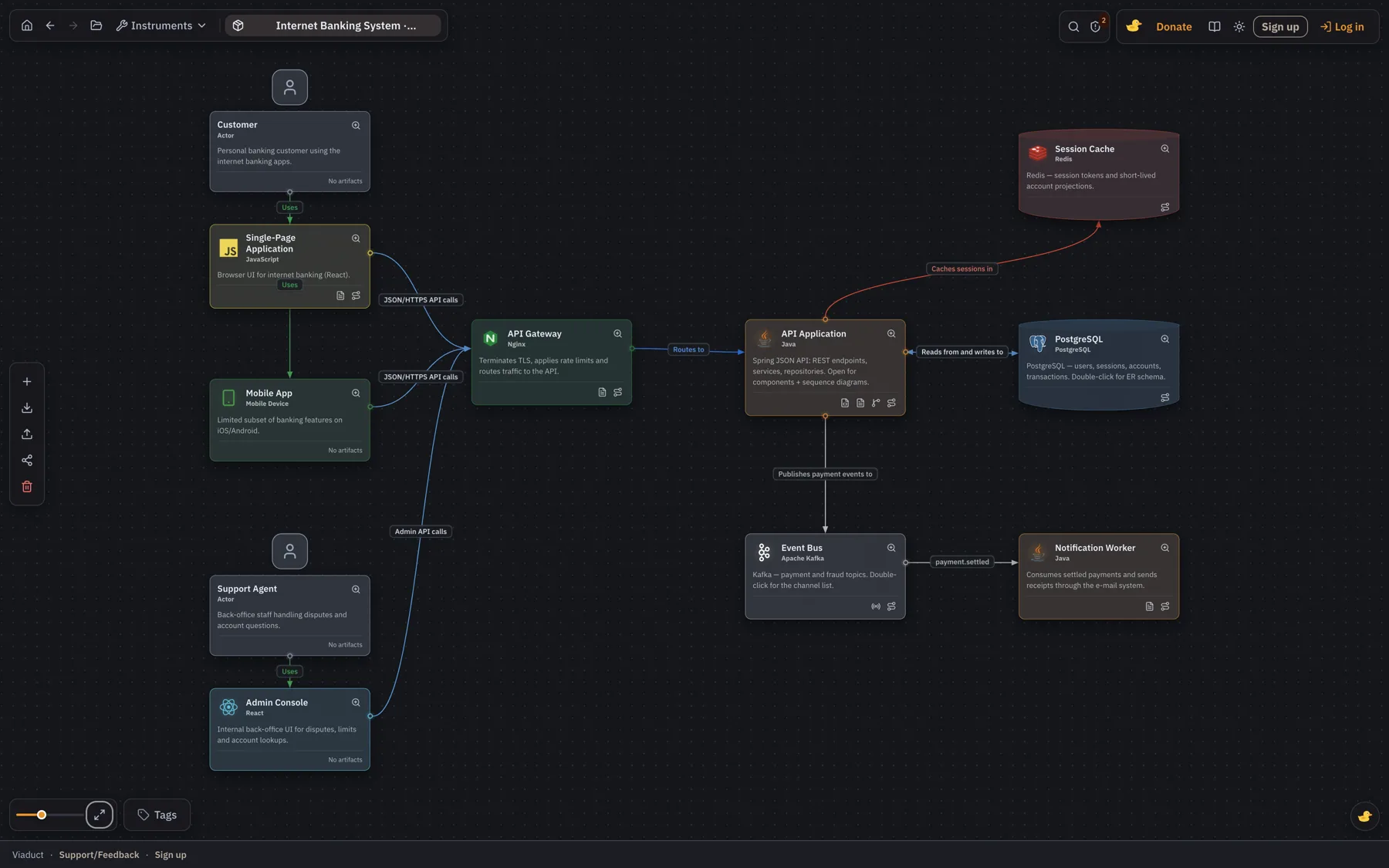
- Containers — applications, databases, web frontends, and other deployable or executable units.
- Components — controllers, services, adapters, endpoints, and internal building blocks.
- Code — classes, interfaces, functions, or other implementation-level objects where that detail is useful.
A small but important clarification: a container in C4 does not mean a Docker container. It is a high-level runtime or data-store boundary such as an API application, a PostgreSQL database, or a single-page web application.
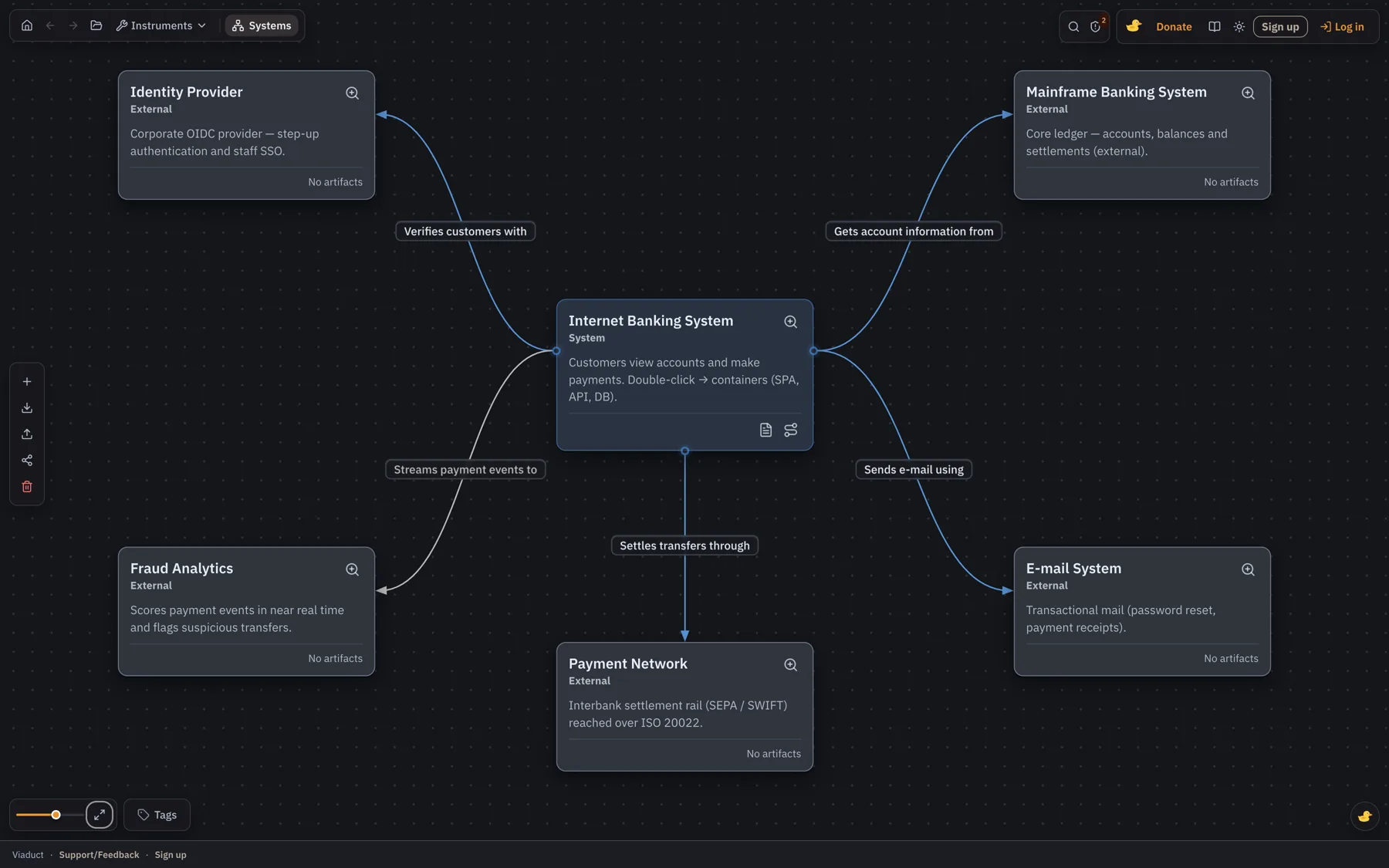
The point of these layers is not to document everything to the same depth. In most systems, Context, Container, and selected Component diagrams are enough. I only use the Code level for the parts that are genuinely hard to understand, risky to change, or important for onboarding.
Documentation belongs to an element
A node on a diagram is rarely self-explanatory.
For example, an Internet Banking System node might need an owner, a business boundary, a list of external integrations, data constraints, or links to operational documentation. An API application needs different information: responsibilities, deployment details, contracts, and important scenarios.
In the editor, Markdown documentation is attached directly to an element. The card indicates when documentation exists, and opening the card opens the relevant document rather than sending the reader on a search through a knowledge base.
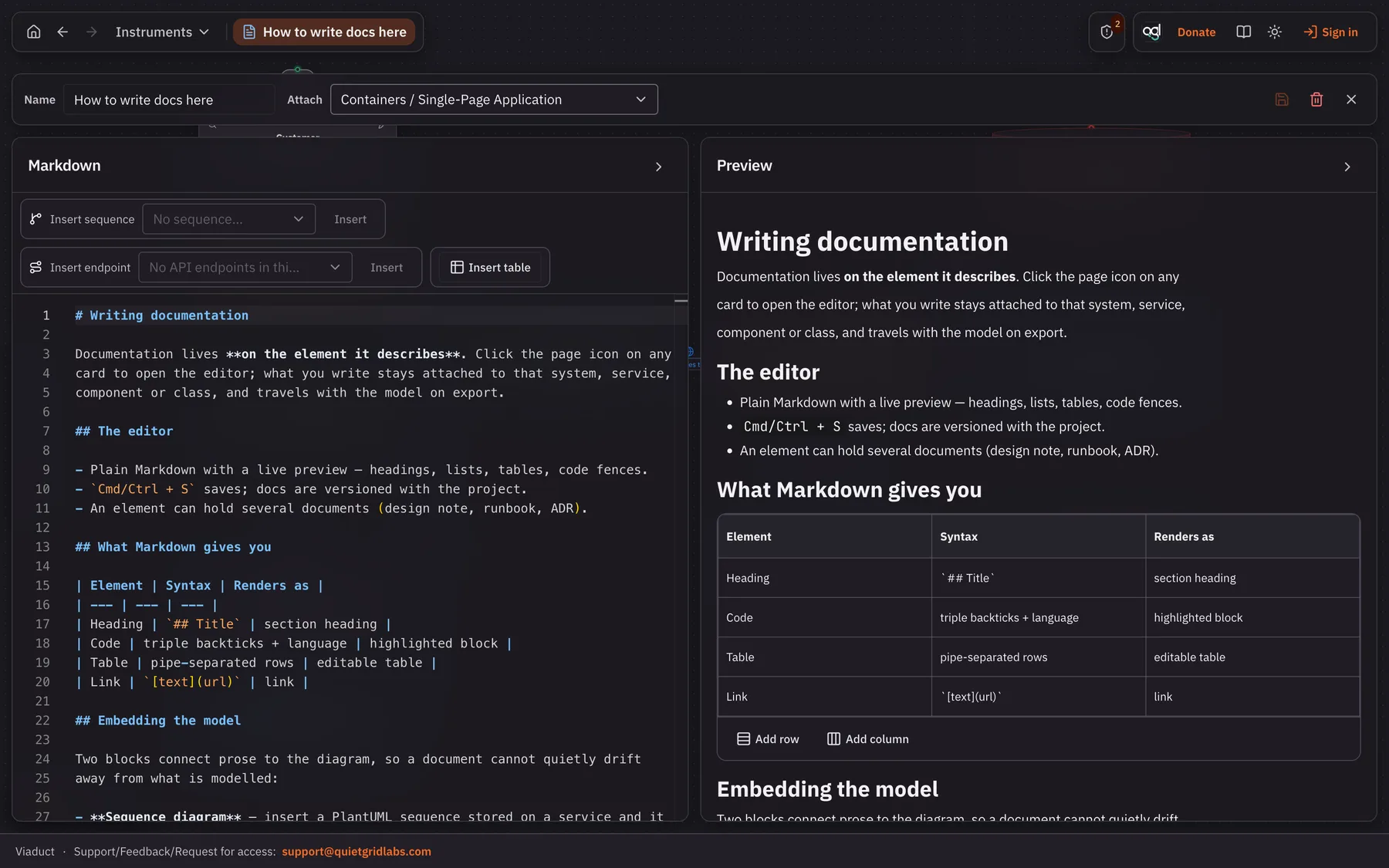
This is deliberately unglamorous. Markdown is familiar, portable, and easy to keep under review. The useful part is not the editor itself; it is the fact that the documentation has an explicit architectural home.
A sequence diagram should not be an orphan
Sequence diagrams explain behavior, while a C4 diagram explains structure. Teams usually need both.
For an API application, I can attach PlantUML sequence diagrams that describe the flows handled by that application. Participants are selected from the current C4 layer, which prevents a sequence diagram from mixing unrelated levels of abstraction.
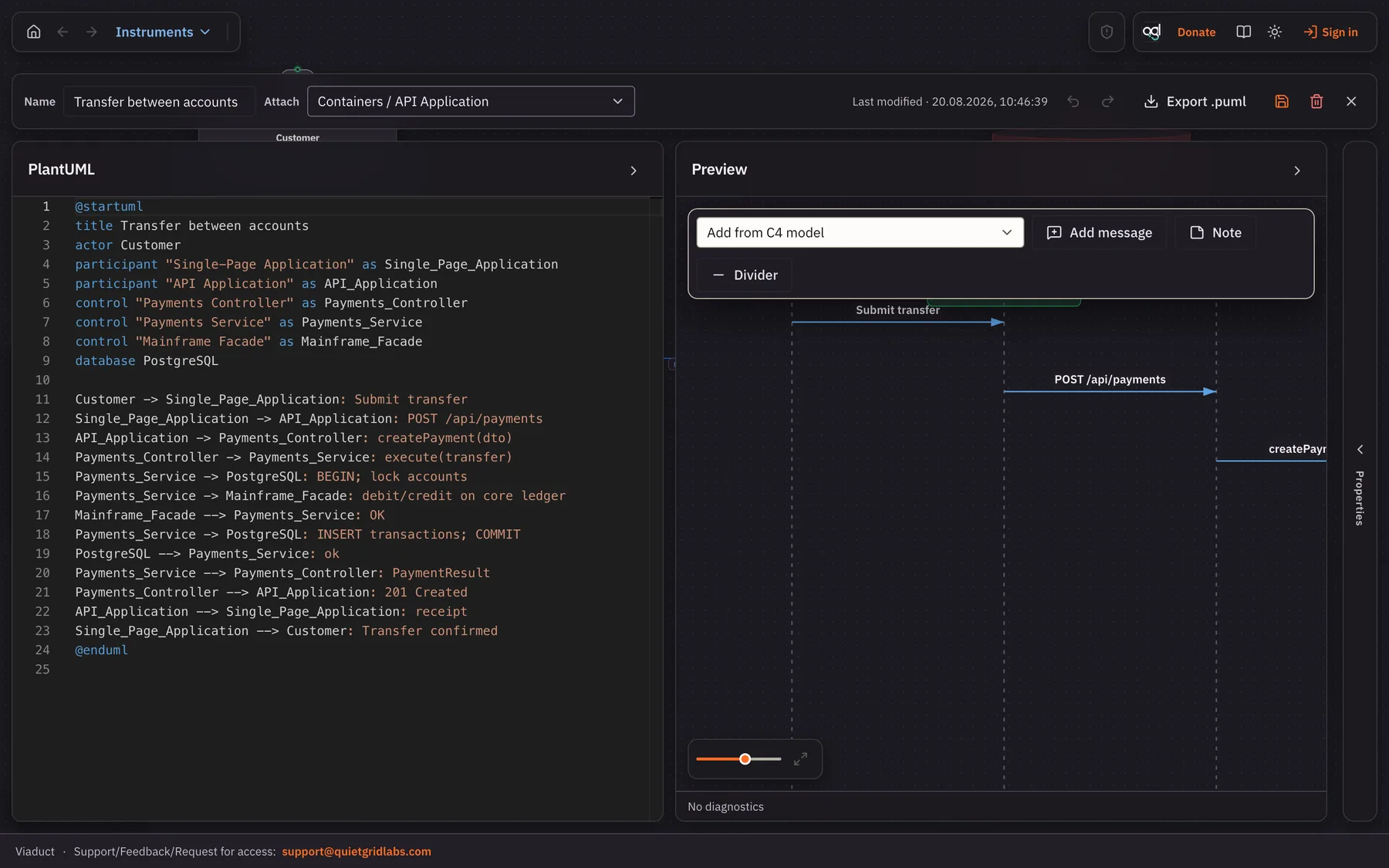
The editor supports group and alt folding for long flows. The same sequence diagram can also be embedded in the Markdown documentation of the element it belongs to.
That gives a reader a more useful path than a wiki link: start with the API application, read what it does, and inspect a specific interaction without losing context.
Following a relationship into the system
The feature I find most useful is relationship tracing.
Imagine a container-level relationship between a single-page application and an API application. The arrow tells us that the frontend calls the API, but it does not answer the question an engineer will ask next:
Which API endpoints, controllers, or services participate in this relationship?
A relationship can be associated with relevant components in the target container. From the relationship menu, the user can then open the component view with those components highlighted.
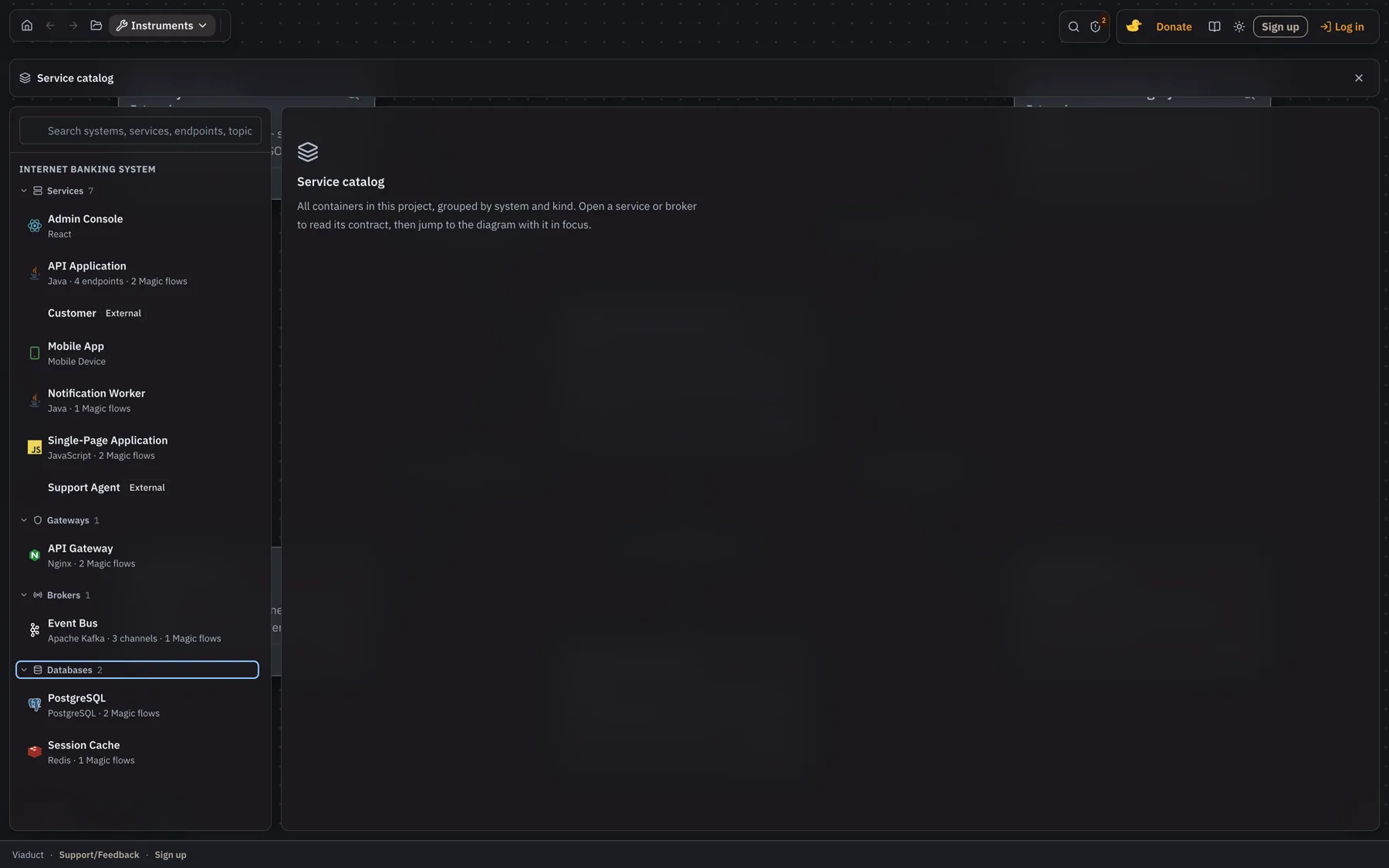
For a review, this makes it possible to move through a path such as:
SPA → API Application → Auth Service → endpoint / internal component
without manually searching multiple diagrams. It is not full runtime tracing, and it does not replace observability. It is architecture navigation: a way to record how the team believes a dependency is implemented.
ER models and API details
A database container can open an ER editor. Tables can have their own documentation, which is useful for recording ownership, retention requirements, migration rules, or the meaning of an overloaded field.
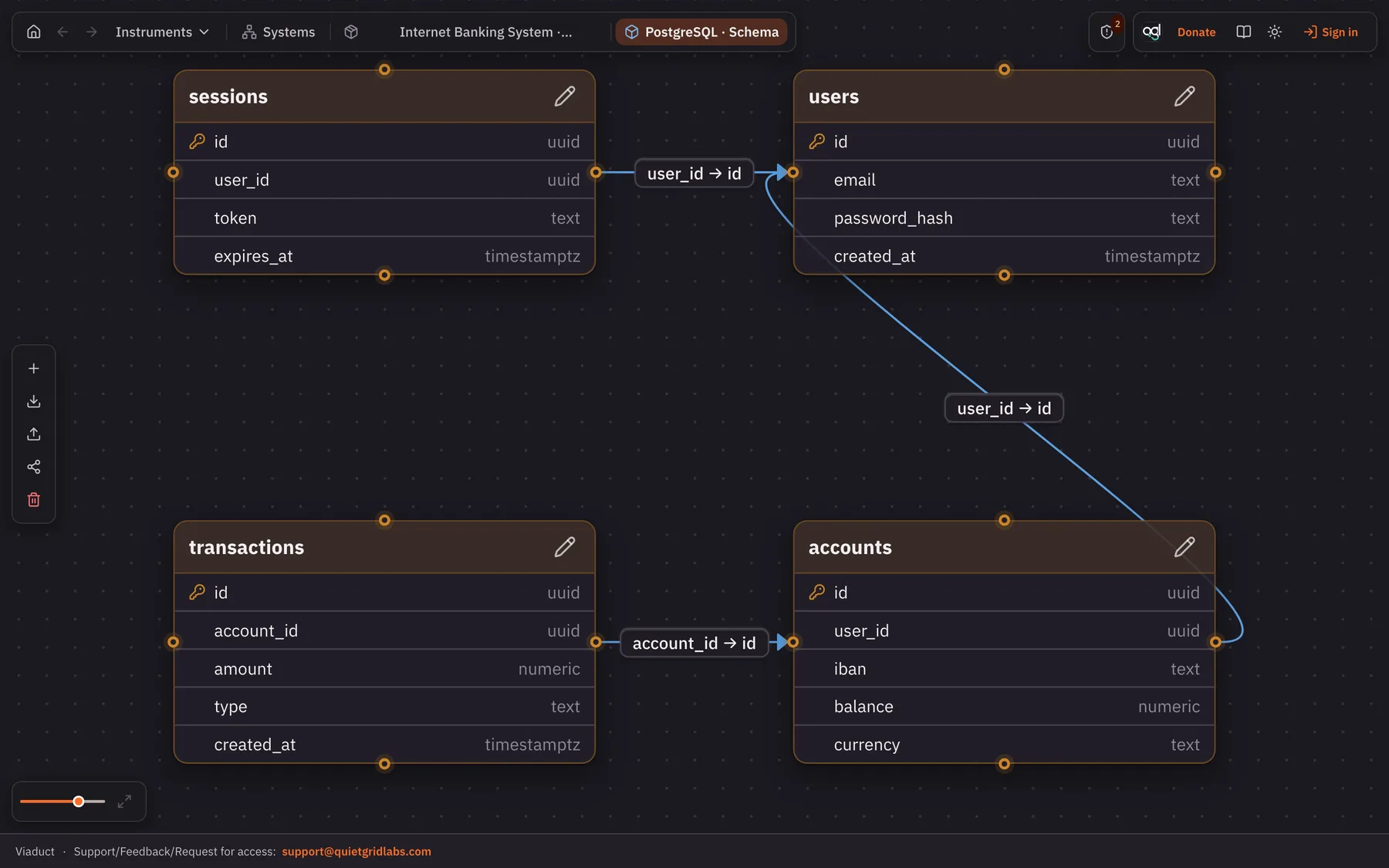
At the Component level, the tool also includes an API Endpoint element. It is intentionally different from a normal component: it does not have a Code child level, but it can hold request, response, and header definitions.
The goal is not to compete with a complete OpenAPI workflow. It is to give an important architectural entry point a place in the model, particularly when reviewing a cross-container integration.
Magic flows
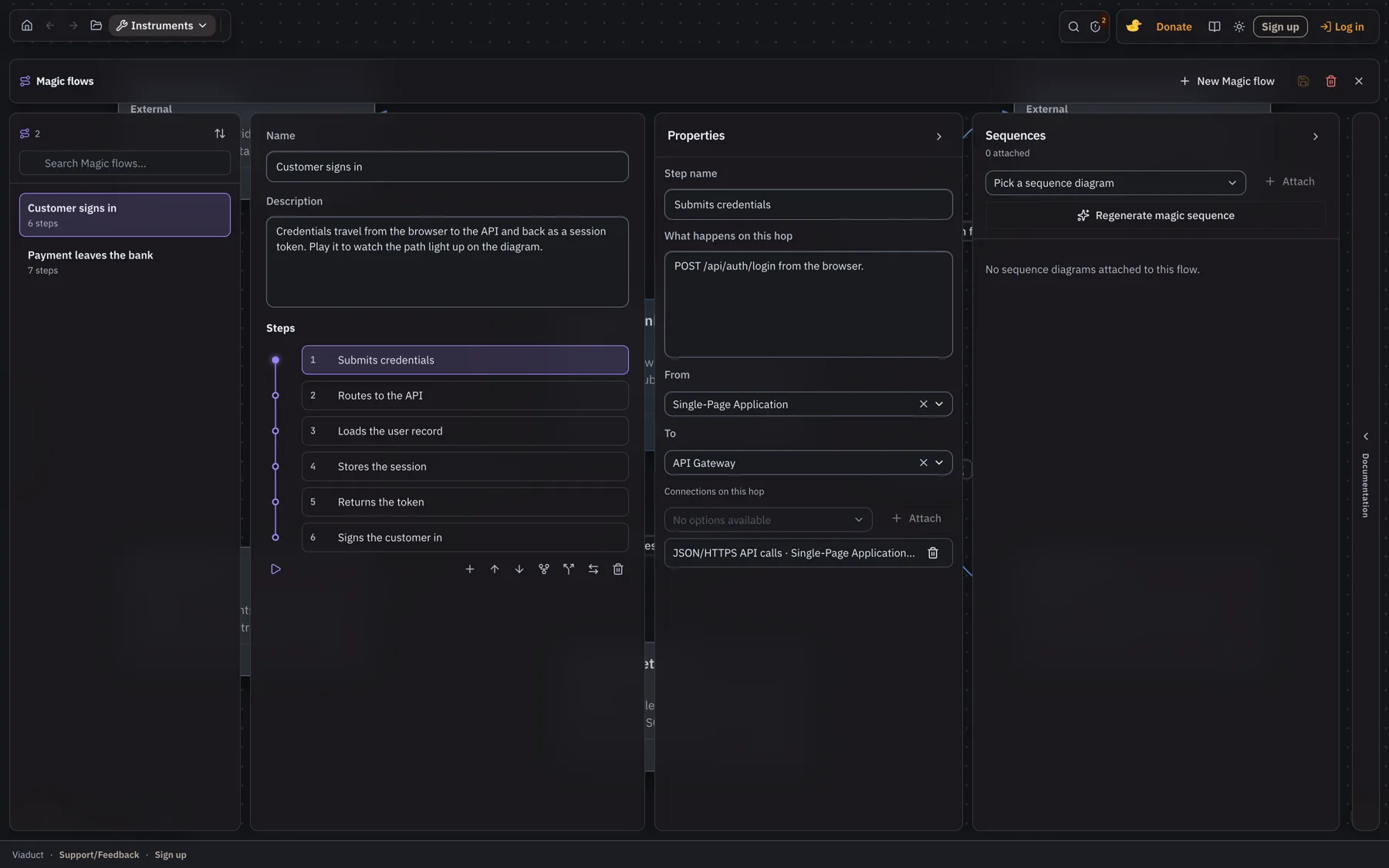
A C4 diagram shows what exists. It does not show what happens when a customer presses a button. A Magic flow is that missing piece: an ordered walk through the model, built from the elements and connections that are already there.
What a flow is made of
- Steps — each names a hop: where it starts, where it ends, and which connection it uses.
- Stages — steps marked as parallel play together, so a fan-out reads as a fan-out instead of a queue.
- Attachments — the docs, sequence diagrams and API endpoints that explain a particular hop.
Playing a flow
Press play and the flow runs on the diagram itself: everything dims except the current hop, the camera follows the request, and arrow keys step back and forth. It is the fastest way to answer “what does this request actually touch?” — during a review, an incident, or someone’s first week.
From a flow to a sequence diagram
A flow can generate a PlantUML sequence diagram from its own steps, so the interaction exists in both forms without being maintained twice. Regenerating overwrites the generated diagram and leaves your hand-written ones alone.
Open flows from the Instruments menu, or from the flow badge on any card that takes part in one.
Collaboration and export
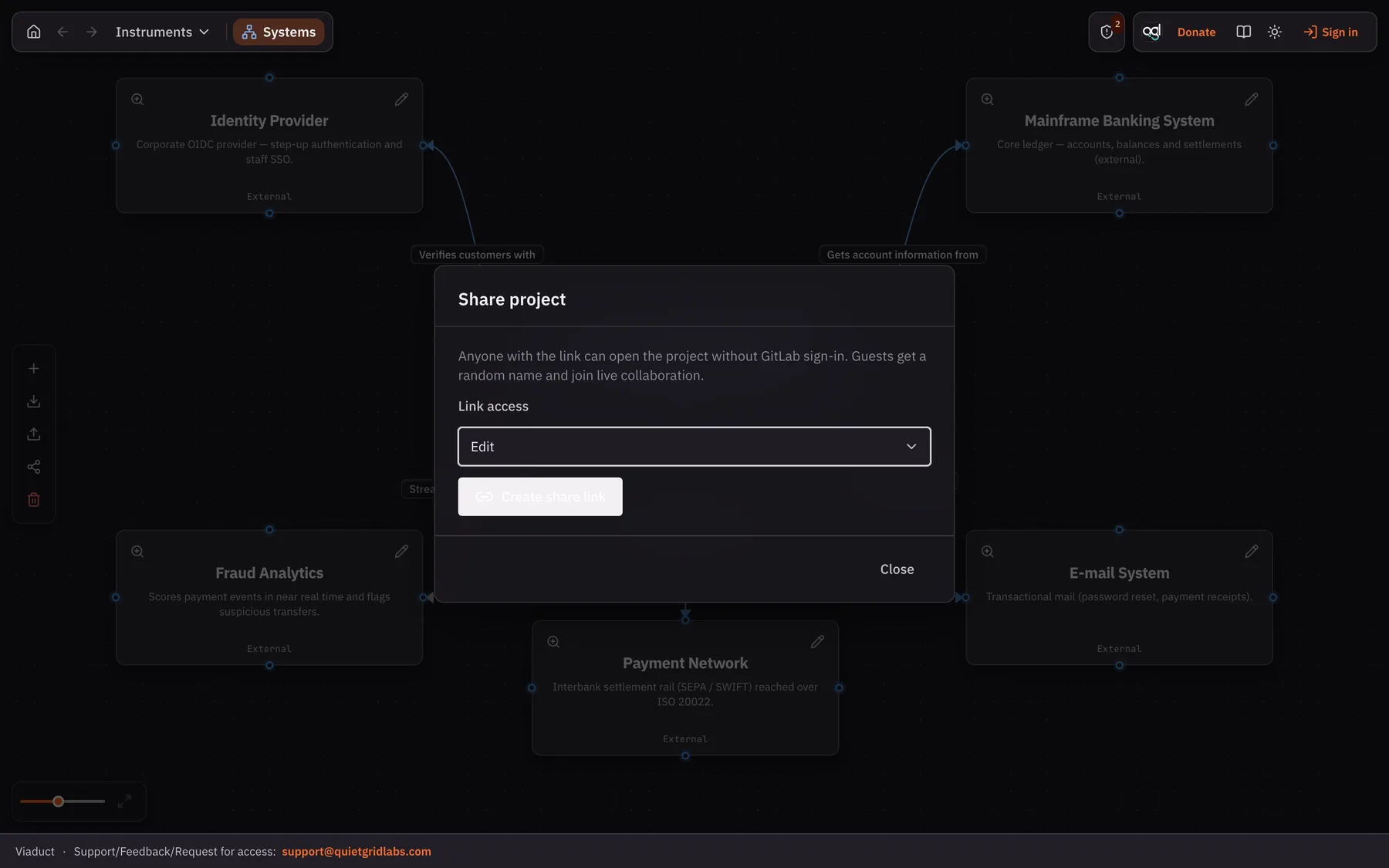
The editor needs an account: projects are saved in the cloud and can be shared with groups, which is what an account is for. When multiple people work on a project, the canvas shows active users and lets you jump to the area where a collaborator is currently working.
Projects can be exported as JSON. An individual element can be exported as a ZIP archive containing its child elements, relationships, documentation, and PlantUML artifacts.
There is also an MCP server for authenticated users, intended to provide architecture context to tools such as Cursor or Claude Code. I see this as context for discussion and implementation assistance, not as a substitute for engineering judgement. Sensitive data and secrets should never be included in exported or LLM-provided context. Setup details are in MCP for Cursor below.
The AI assistant, and how its allowance is counted
Two jobs in the editor are dull, mechanical and therefore never done: writing the description of an element nobody described, and reading the whole model looking for what is wrong with it. The assistant does those. It runs on our provider, so there is no key to obtain and nothing to configure — you sign in and the buttons are there.
What it can do
- Describe an element — the ✨ button beside the character count in any element panel. It reads the element, its parent and the elements it talks to; it does not read your code.
- Review the model — the ✨ button in the toolbar opens a panel that reports what is undescribed, what nothing talks to, what looks like the same job done twice, and the shapes that tend to hurt later: a datastore several services write into directly, a service everything depends on, a dependency cycle.
Nothing is applied on its own
A suggested description is shown to you and lands in the model only when you press Use it. Findings are read-only: each one names a real element, clicking it takes the canvas to that element, and what to do about it stays your decision. A finding that names something not in your model is discarded before you see it — the panel says how many were discarded, so you can judge how much the assistant is inventing.
A review is stored with the project, not with your browser: it survives a reload, and your colleagues read the review you already paid for instead of running it again. It is a snapshot, so the panel says when it was taken.
How the allowance is counted
Every account gets an allowance for the calendar month, and it starts fresh on the first. Spending is measured in units, not in requests: a call costs one unit per token sent and eight per token written back, because that is the ratio the provider charges. This is why the assistant is careful with its output — descriptions are capped at 120 characters and a review at a dozen findings.
- A description costs roughly a thousand units; a review of a sixty-element model about twelve thousand. In practice a review is about ten descriptions.
- Before a call the worst case is held back, and the difference is returned the moment the answer arrives. That is why a review can be refused while a description still goes through — the two ask for different amounts, and the message says which case you are in: used up means nothing is left, not enough left for this means a smaller request would still work.
- Asking twice for the same thing is free. An answer is kept against the exact context it was written for, so pressing the button again on an unchanged element costs nothing. Change the element — or any of its neighbours — and it is a new question.
- Guests can draw, but not use the assistant: the calls cost real money, so they need an account behind them.
When the allowance runs out the buttons say so and stop; nothing else in the editor is affected, and the next month starts clean.
Bringing a model of your own
The chat agent can run on an endpoint you host yourself — a Qwen served by vLLM on a RunPod pod, an Ollama on your own machine, anything that answers an OpenAI-style /chat/completions. In account settings, under Assistant, give the base URL (the address up to and including /v1), the model name the endpoint expects and, if it asks for one, an API key. The model then appears on your list beside the ones the server offers, and nothing sent to it is counted against your allowance. The key is stored encrypted and never shown again; the endpoint is yours alone and is not shared with the people you share a project with.
What this tool does not solve
I want to be explicit about the limits.
- It does not automatically prove that the architecture model matches production.
- It does not replace ADRs, OpenAPI/AsyncAPI, source code, or observability.
- It does not mean every class deserves a C4 Code-level diagram.
- It does not eliminate the human work of keeping documentation current.
What it tries to do is give that human work a better structure: one place to navigate from a system boundary to a specific interaction, component, document, or data model.
MCP for Cursor & Claude
Viaduct ships an MCP server so Cursor, Claude Code, Claude Desktop — any MCP client — can pull live architecture context into another codebase: systems and services, API endpoints (method, path, headers, request, response), markdown documentation, and PlantUML sequence diagrams.
The server is hosted at https://mcp.quietgridlabs.com/mcp. Nothing to clone, nothing to install — point your client at the URL and send your token with it. Each request carries its own token, so the server never holds anyone’s credentials.
What you need
- Signed-in access to Viaduct (organization account).
- An MCP client: Cursor, Claude Code, Claude Desktop, or any other.
1. Create a personal API token
Sign in, then open the gear next to your username in the top-right toolbar → Account settings → Create token. The dialog also copies a ready-made mcp.json entry with the token already in it.
- The token is shown once. The server keeps only a hash, so a lost token is reissued, never recovered.
- One token per client. Creating another leaves the existing ones working, so adding a second editor never signs the first one out.
- Config next to a token downloads the file its client expects — Cursor, Claude Code or Claude Desktop, each in the right shape. A token you just created comes out with the value already in it; an older one leaves a placeholder to paste over, since the value itself was never stored.
- Revoke next to a token cuts off that client alone, without touching the others or your browser session.
- Tokens do not expire and are independent of your browser session, which ends after four hours of inactivity. The list shows when each was last used, so a client that was never wired up correctly is easy to spot.
The same thing over HTTP, if you would rather script it. The cookie value comes from DevTools → Application / Storage → Cookies → c4_uid; copy it and run the command in one go, since it is only valid for four hours.
curl -sS -X POST 'https://c4.quietgridlabs.com/api/auth/api-token' \
  -H 'Cookie: c4_uid=PASTE_COOKIE_VALUE' \
  -H 'Content-Type: application/json' \
  -d '{"name":"Claude Code"}'
Example response:
{
  "id": "5f0c…",
  "token": "c4pat_…",
  "name": "Claude Code",
  "createdAt": "2026-…",
  "expiresAt": null,
  "hint": "Store this token in your MCP client config…"
}
To list what the account has — names, creation and last use, never the tokens themselves:
curl -sS 'https://c4.quietgridlabs.com/api/auth/api-token' \
  -H 'Cookie: c4_uid=PASTE_COOKIE_VALUE'
To revoke one by id, or every token on the account:
curl -sS -X DELETE 'https://c4.quietgridlabs.com/api/auth/api-token/TOKEN_ID' \
  -H 'Cookie: c4_uid=PASTE_COOKIE_VALUE'

curl -sS -X DELETE 'https://c4.quietgridlabs.com/api/auth/api-token' \
  -H 'Cookie: c4_uid=PASTE_COOKIE_VALUE'
2a. Configure Cursor
Add a server entry to ~/.cursor/mcp.json (global) or .cursor/mcp.json in a project:
{
  "mcpServers": {
    "viaduct": {
      "url": "https://mcp.quietgridlabs.com/mcp",
      "headers": {
        "Authorization": "Bearer c4pat_PASTE_TOKEN_HERE"
      }
    }
  }
}
Reload MCP in Cursor (Customize / MCP settings, or restart Cursor). Confirm the server shows as connected.
2b. Configure Claude Code
Claude Code reads MCP servers from a .mcp.json file at the root of the project you are working in — commit it and everyone on the repository gets the same architecture context:
{
  "mcpServers": {
    "viaduct": {
      "type": "http",
      "url": "https://mcp.quietgridlabs.com/mcp",
      "headers": {
        "Authorization": "Bearer c4pat_PASTE_TOKEN_HERE"
      }
    }
  }
}
If you do commit it, keep your own token out of the file — it is a personal credential, and a shared one lets everybody act as you.
The same thing from the terminal, without editing files by hand:
claude mcp add --transport http viaduct https://mcp.quietgridlabs.com/mcp \
  --header "Authorization: Bearer c4pat_PASTE_TOKEN_HERE"
Then run /mcp inside Claude Code to check the server is connected and to see the tools it exposes.
2c. Configure Claude Desktop
Claude Desktop keeps its servers in a config file — Settings → Developer → Edit config opens it, or edit it directly:
- macOS: ~/Library/Application Support/Claude/claude_desktop_config.json
- Windows: %APPDATA%\Claude\claude_desktop_config.json
Recent versions add a remote server under Settings → Connectors → Add custom connector, which only asks for the URL. If your build has no Connectors screen, use the config file with a local bridge instead — Claude Desktop’s config file understands commands, not URLs:
{
  "mcpServers": {
    "viaduct": {
      "command": "npx",
      "args": [
        "-y", "mcp-remote", "https://mcp.quietgridlabs.com/mcp",
        "--header", "Authorization: Bearer c4pat_PASTE_TOKEN_HERE"
      ]
    }
  }
}
Restart the app after saving.
3. Quick smoke test
- Ask the agent to run c4_whoami — you should see your username.
- Then c4_project_access and c4_project_context for a project you own or can edit.
- Not connecting? Check the server itself first — this needs no client and no token: curl https://mcp.quietgridlabs.com/healthz.
Available tools
- c4_whoami, c4_list_projects, c4_project_access — auth and edit rights (`canEdit`)
- c4_project_context, c4_get_element, c4_search — read model / docs / sequences. The context comes in a compact one-line-per-element notation with a legend on top (about a third fewer tokens than markdown, and it carries the connections); pass format: "markdown" for the older form.
- c4_create_element, c4_update_element, c4_delete_element — write architecture (requires edit)
- c4_upsert_connection, c4_layout, c4_upsert_doc, c4_upsert_sequence — edges, markdown, PlantUML (requires edit)
- c4_list_change_sets, c4_get_implementation_bundle, c4_report_progress — implement a change set and report what is finished
- c4_create_branch, c4_list_branches, c4_branch_changes, c4_branch_review, c4_merge_branch — propose changes on a branch instead of on the model everyone works from: fork one (a project with no version gets one pinned first), pass the id it answers back as projectId on every write, then merge it once it has been reviewed
How it behaves day to day
- Write tools refuse projects where your share is view-only.
- A protected project refuses every direct write, whoever you are — c4_create_branch is the way in, and the merge is where a person signs off. A merge needs the revision the branch was last reviewed against, so nothing lands on a trunk that moved since.
- Your token travels with each request and is never stored on the server. Revoking it in Account settings cuts off every client at once.
- Useful prompt: “Check c4_project_access, then use c4_create_element / c4_upsert_doc for project <id>.”
- Treat the token like a password — do not commit it to git.
Change sets: handing work to an agent
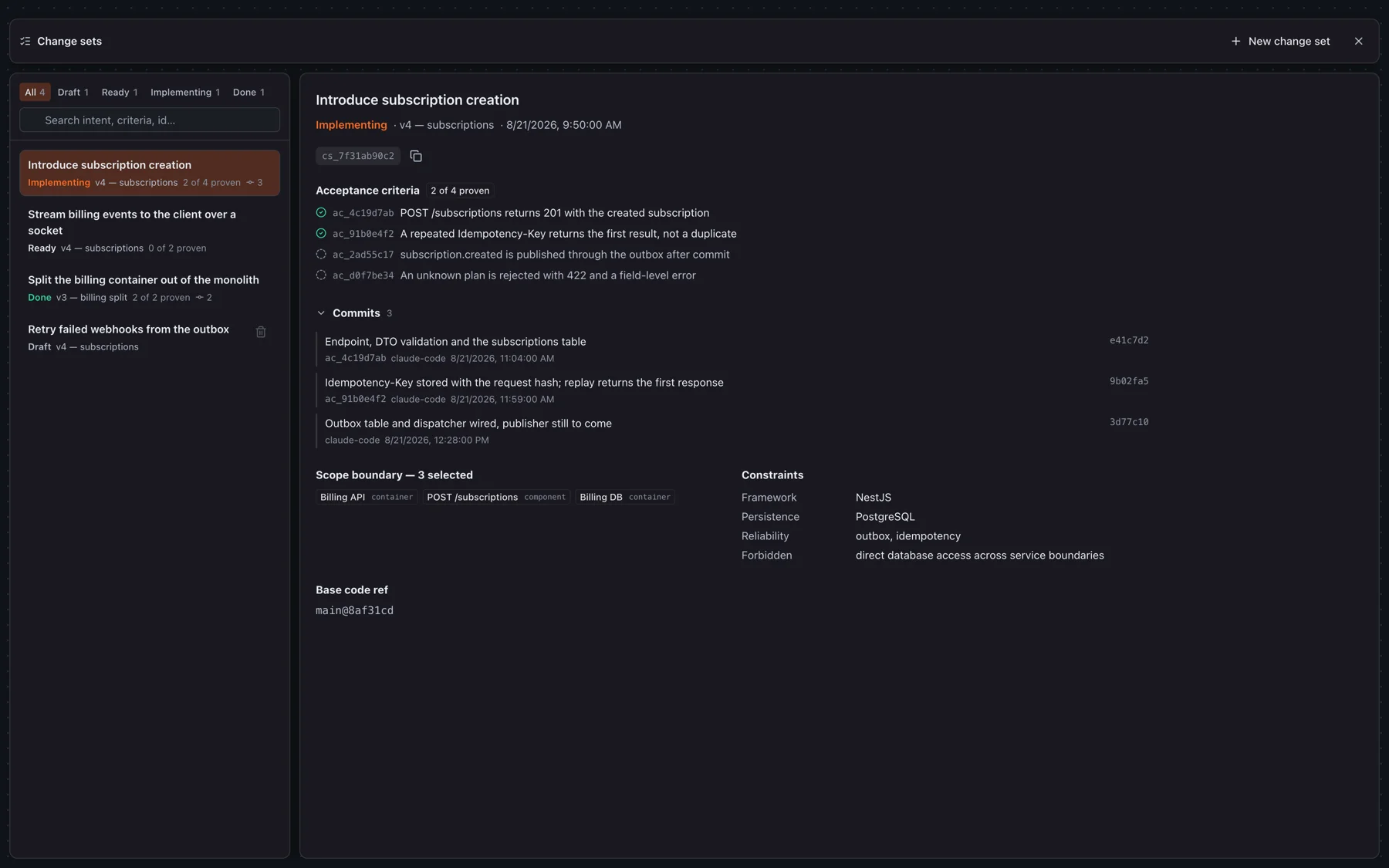
An agent that reads the live model is aiming at a moving target: someone renames a container while it works, and half its assumptions quietly expire. A change set is a piece of work written against a pinned version — one that cannot move while the work is being done.
What a change set holds
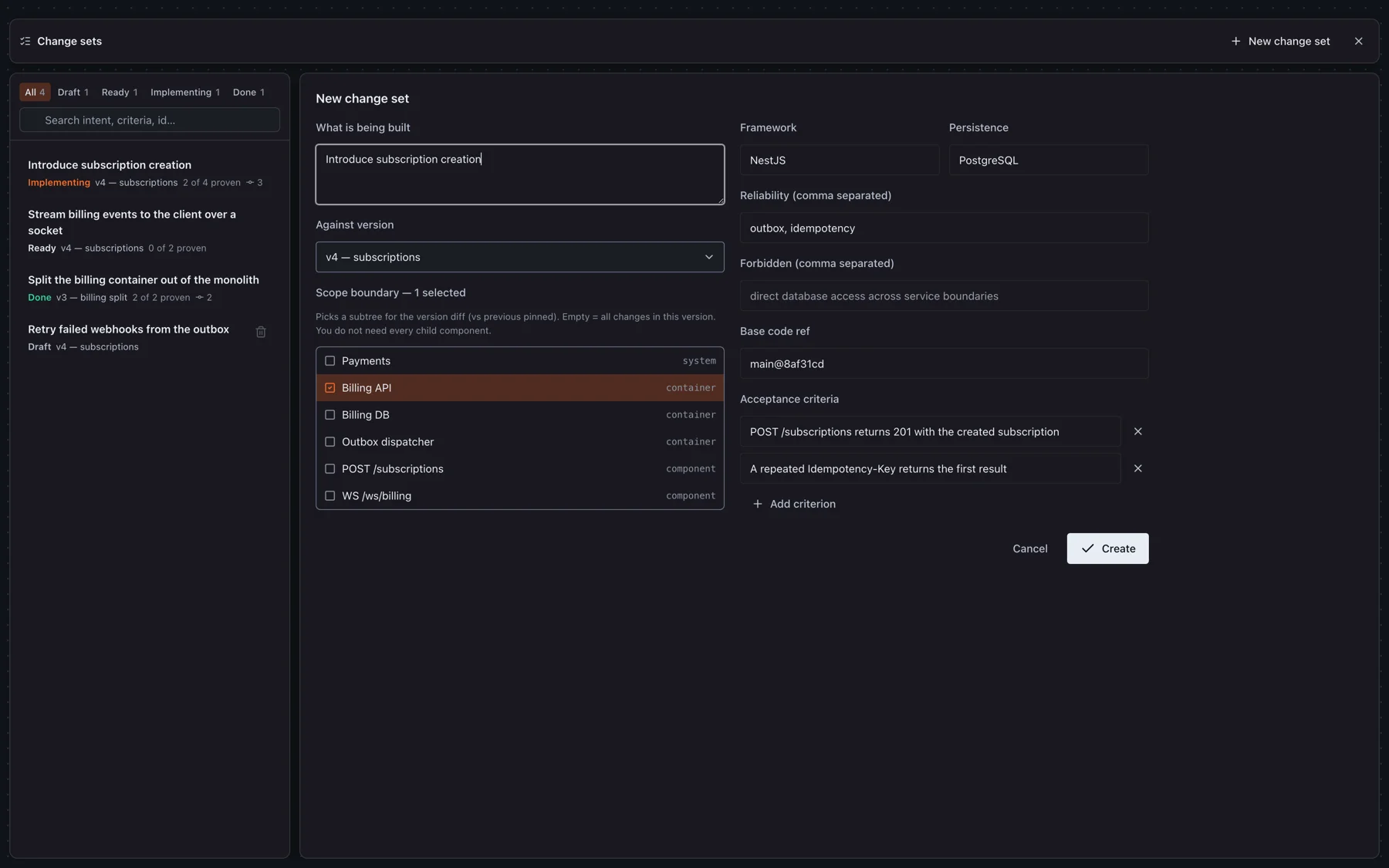
- Intent — one sentence: what is being built.
- Version — the pinned revision the work stands on. Everything the agent reads comes from it.
- Scope — the elements this work may touch. The picker offers what actually changed in that version compared to the previous pinned one, plus their parents, so a system can cover its children without listing each of them.
- Constraints — framework, persistence, reliability patterns, and what is forbidden. Decisions already made, so the agent does not re-make them.
- Acceptance criteria — each gets an ac_… id that a test name cites. This is what makes “done” a fact rather than a claim.
- Base code ref — the commit the implementation starts from, when you know it.
1. Pin a version, then write the change set
Cut a version from the rail at the bottom-left of the canvas — a change set can only stand on a pinned one, because an automatic snapshot may be evicted and take the work with it. A version identical to the previous one is refused: there is nothing in it to implement.
Then open Instruments → Change sets (or the same entry from the version rail) and press New change set. The catalog lists everything the project has, filtered by status.
2. Hand it over
Open the change set and press Copy agent handoff. You get a prompt with both ids already in it — paste it into Cursor, Claude Code, or anything else wired to the MCP server. It tells the agent to:
- mark the work started, then fetch c4_get_implementation_bundle — a scoped diff of that revision against the previous pinned version, with the contracts, neighbours, flows and documentation of the elements in scope, and nothing else from the graph;
- treat the bundle as the specification — if something in it is wrong or missing, say so rather than editing the model mid-flight;
- write a test per criterion with its ac_… id in the test name;
- call c4_report_progress after each finished piece, with the summary, the criterion it proves and the commit sha.
Endpoints arrive with their protocol spelled out, so an agent knows whether it is implementing a request/response call or a channel:
"contract": {
  "protocol": "websocket",
  "method": "WS",
  "path": "/ws/orders",
  "response": "order.created message, one per accepted order"
}
3. Watch it move
Status is derived from evidence, never announced: a change set is a draft until work is reported against it, implementing from the first report, and done when every criterion has evidence behind it. Nobody has to remember to close it.
The catalog updates itself while you watch — the server pushes each change over the collaboration socket, with a poll behind it for sessions that have no socket. Leave it open on a second monitor and you can see commits landing against criteria without touching the page.
Only a draft can be deleted. Past that point the change set carries the record of work that actually happened — criteria cited by tests, commits reported against them — and throwing it away would erase that.
Tools an agent uses
- c4_list_change_sets — what work exists and where it stands.
- c4_get_implementation_bundle — the specification for one change set, pinned to its revision.
- c4_report_progress — one finished piece: summary, criterion, commit ref.
- c4_set_change_set_status — for the transitions evidence cannot make on its own.
Change sets belong to accounts: a project opened through a share link can be read and edited, but its versions and change sets stay out of reach.
REST API
The same endpoints the MCP server uses are public under /api/v1. Authenticate with the personal access token from Settings → MCP access, the one your editor already holds:
curl https://c4.quietgridlabs.com/api/v1/projects \
  -H "Authorization: Bearer c4pat_…"
A token carries scopes. read covers every GET; write is needed for anything that changes something, and a token without it is answered 403 insufficient_scope. Issue a read-only one for CI and dashboards — it cannot touch the model even if it leaks.
- Every failure carries a code and a sentence: { "error": "not_found", "message": "…" }.
- 600 requests per minute per token. Over it, 429 with Retry-After.
- Collections that can grow take limit and cursor, and answer with next_cursor. Ask for neither and you get the list whole.
- The unversioned /api paths are what this application calls and are free to change. Build against /api/v1.
Every endpoint, with its parameters and responses, is on the API reference.
That page reads the OpenAPI document at /api/v1/openapi.json — point a client generator at the same URL, or open it in any viewer you prefer.
Webhooks
A project can post its changes to your endpoint. Add one on the webhooks button in the editor rail — it is the owner's to set, since it decides where a copy of every change goes. Events:
- element.created / updated / deleted — systems, containers, components and code elements.
- connection.created / updated / deleted.
- change_set.status_changed — the one a pipeline usually waits for.
Events arrive after the model settles, not on every keystroke, and say what changed rather than carrying the whole model. When one lands, ask the API for the current state of what it names.
POST /your/endpoint
X-Viaduct-Event: element.updated
X-Viaduct-Timestamp: 1788370155
X-Viaduct-Signature: 9f2b…

{
  "event": "element.updated",
  "project_id": "…",
  "resource_id": "…",
  "occurred_at": "2026-09-02T18:00:00.000Z",
  "actor_id": "…",
  "before": { "id": "…", "name": "Billing", "level": "system" },
  "after":  { "id": "…", "name": "Billing API", "level": "system" }
}
Verify before you trust it. The signature is HMAC-SHA256 over timestamp.body with the secret shown once when the webhook is created:
const signed = `${req.headers['x-viaduct-timestamp']}.${rawBody}`;
const mine = crypto.createHmac('sha256', SECRET).update(signed).digest('hex');
const fresh = Math.abs(Date.now() / 1000 - Number(req.headers['x-viaduct-timestamp'])) < 300;
if (!fresh || mine !== req.headers['x-viaduct-signature']) return res.sendStatus(400);
Non-2xx answers are retried five times over an hour, widening the gap each time; an endpoint that keeps failing is switched off and says so in its delivery log, which the dialog shows. Endpoints must be https and public — an address on a private network is refused when you add it and again before every delivery.
Contact
Questions, feedback or support — write to Quiet Grid Labs:
Or email support@quietgridlabs.com directly.
Need the editor again? Open Viaduct