
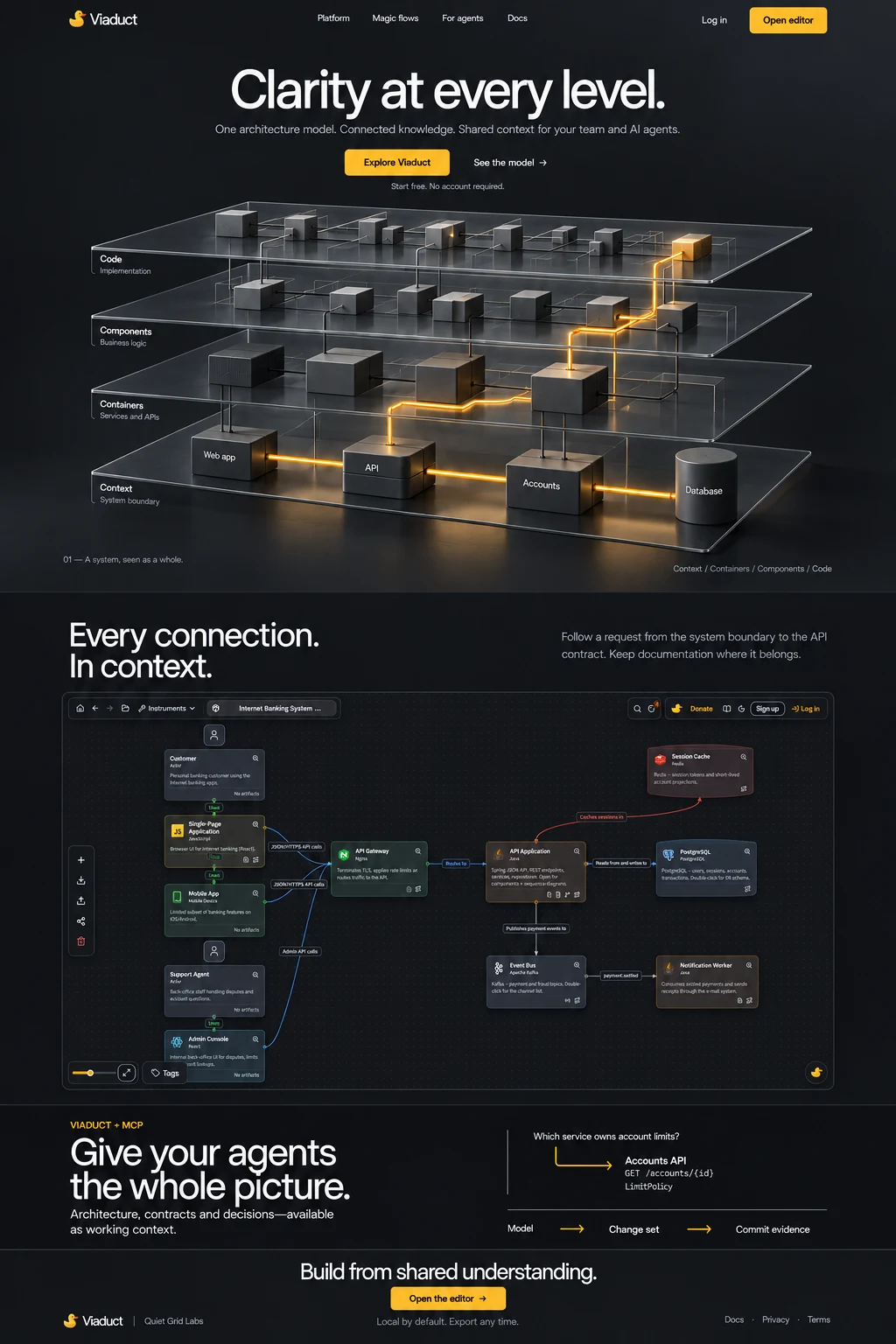
Clarity at every level.
One architecture model. Connected knowledge. Shared context for your team and AI agents.
Free in the browser with an account — every C4 level, the hosted MCP server and change sets included. The desktop app is the only paid part: 7 days free, then €10 a month.
Watch it work.
Watch a partial refund travel through Viaduct: the C4 levels, the flow played hop by hop, a change set, and a coding agent reading it all over MCP.
Every connection.In context.
Follow a request from the system boundary to the API contract. Keep documentation where it belongs.
Viaduct + MCP
Give your agentsthe whole picture.
Architecture, contracts and decisions — available as working context.
How the MCP server and change sets workWhich service owns account limits?
- Accounts API
- GET /accounts/{id}
- LimitPolicy
What the agent reads back over MCP
- Model
- Change set
- Commit evidence
What it costs
Free in the browser.The app is the only thing you buy.
The same editor either way. Everything you have just seen is free with an account and stays free; the version you run on your own machine is the one paid thing on this site.
Free, in the browser
The cloud version is free: €0 a month, with an account, and it stays that way.
A free account gives you all four C4 levels, Magic flows, documentation, ER schemas, contracts, change sets, team projects and the hosted MCP server. No trial that ends, no feature behind a plan. The subscription below buys the desktop app and nothing else.
Desktop licence
7 days freethen €10 a month
The trial starts the first time you open the app — no card, no account. After that a licence key keeps it running, billed monthly and cancelled whenever you like.
Subscribe- 7 days free, no card asked for
- Projects are JSON files you own
- MCP server built in, on 127.0.0.1
- One licence covers 3 machines
- Works offline between checks
Viaduct Desktop
The same editor,on your own machine.
A native app with the whole model in it and its own MCP server on localhost. Projects are plain JSON files in a folder you pick, so Cursor and Claude read your architecture without anything leaving the machine.
Debian and Ubuntu, 64-bit · DEB · free for 7 days
macOS
Apple Silicon (M1 and later)
Download DMGWindows
64-bit (x64)
Download EXELinuxYour system
Debian and Ubuntu, 64-bit
Download DEB
The builds are not code-signed yet: on macOS, right-click the app and choose Open the first time.
Build from shared understanding.
Create a free accountThe browser version is free with an account. Only the desktop app is a subscription.
Answered before you have to ask
What does it cost?
Viaduct here, in the browser, is free — every level, the MCP server, collaboration and change sets included. It takes an account, and the account is what costs nothing: no trial that ends and no feature held back behind a plan. If you want the work to continue you can donate, and that buys nothing but the work continuing. The one paid thing is Viaduct Desktop, the app you download and run on your own machine: it is free for 7 days, then €10 a month.
What is the AI assistant, and what does it cost me?
It writes the parts of a model people leave blank: descriptions for elements that have none, names for unnamed flow steps, and a review of the whole model that points at real elements rather than giving generic advice. It runs on our provider, so there is no key to obtain and nothing to configure, and every account gets a monthly allowance of it. Nothing it suggests is applied on its own — you see the text and press a button, or you do not.
What is Viaduct Desktop, and do I need it?
It is the same editor as a native app for macOS, Windows and Linux, with its own MCP server running on your machine. Projects are plain JSON files in a folder you choose, so nothing reaches a server at all — which is the point for people who cannot put an architecture in a browser tab. You do not need it: the browser edition is free with an account and gives you the whole model. The desktop app is free for 7 days on each machine, then €10 a month, and one licence covers 3 machines.
Do I need an account?
Yes, and it is free. The editor opens with a sample model to take apart, and everything it saves — projects kept across devices, sharing with your team, change sets, the MCP server — needs somewhere to save it to. Signing up takes a GitLab, Google or GitHub identity, no card and no trial clock. The browser-only mode that saved nothing is gone; if you need a Viaduct that keeps the model on your own machine, that is the desktop app.
Where does my architecture live?
On servers inside the EU, along with the backups. You can export the whole model as JSON, and any container’s contracts as an OpenAPI document, whenever you like — or run the desktop app, where projects are files in a folder you choose and nothing reaches a server at all.
What can an AI agent do with it?
Read the model and write to it: Cursor, Claude Code, Claude Desktop or any other MCP client can ask what talks to what and over which contract, and can add services, endpoints, connections and documentation back. Access needs a personal token you issue yourself, scoped to your projects, and revoking it ends the access immediately.
How is this different from a diagramming tool?
A diagram is a picture; this is a model. An element exists once and appears on every level it belongs to, so a rename or a new dependency shows up everywhere at once. The endpoints on a container are a real OpenAPI document, not labels on a box — which is what makes the whole thing readable by something other than a person.
Can I bring what I already have?
Import an OpenAPI specification and the endpoints land on the container with their parameters, request bodies and responses. Models export and import as JSON, so moving a workspace — or keeping a copy outside this service — is a file.