
Viaduct

Viaduct

One model, all the way down.

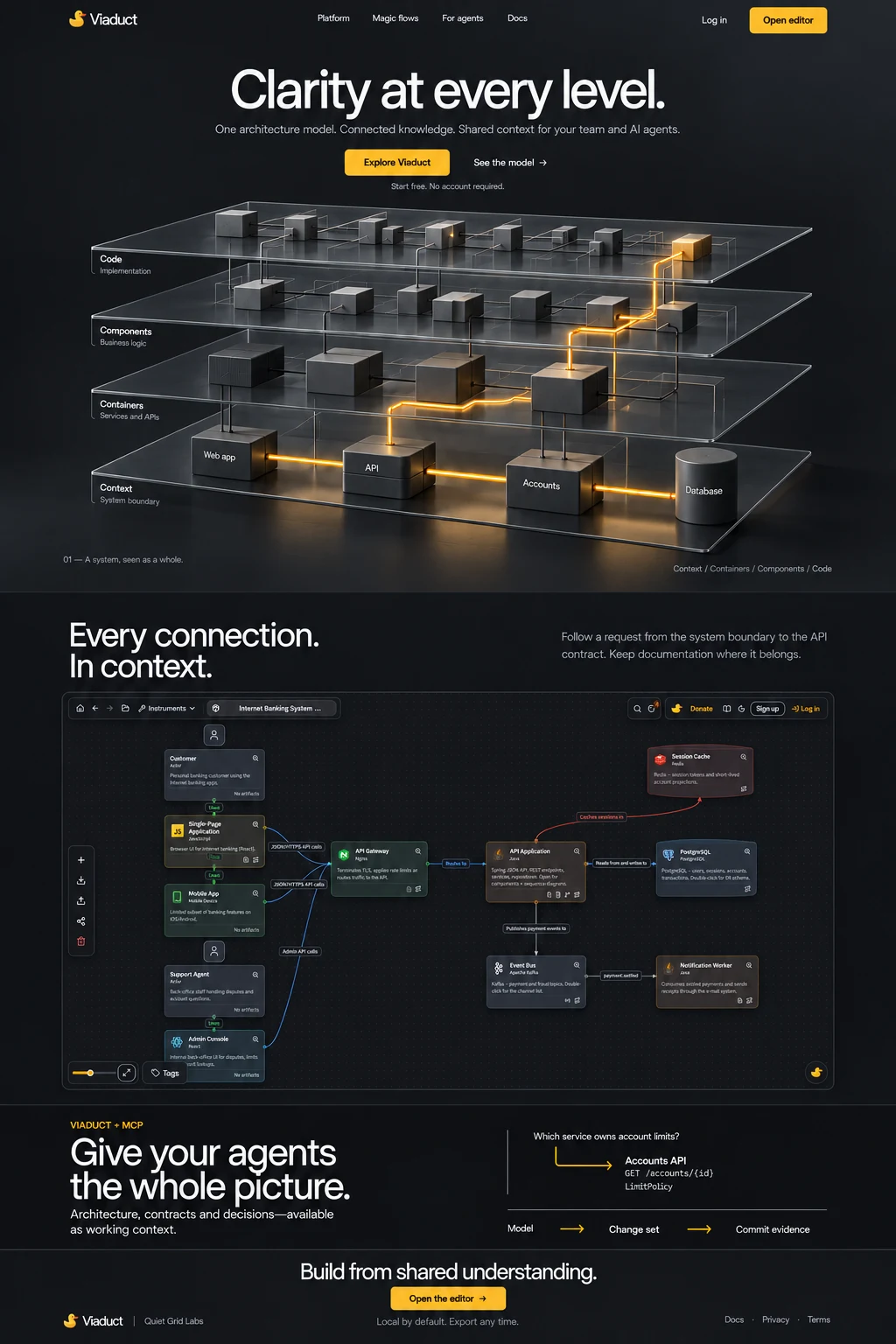
Open a system to see its containers, a container to see its components. Docs, data flows and contracts hang off the elements.

Context: System boundary. Containers: Services and APIs. Components: Business logic. Code: Implementation

Viaduct in 76 seconds

A partial refund, traced through Viaduct: the C4 levels, the flow played hop by hop, a change set, then a coding agent reading all of it over MCP.

Follow one requestthrough every level.

From the system boundary down to the API contract, with the documentation on the element it describes.

Viaduct + MCP

Give your agentsthe whole model.

Architecture, contracts and the decisions behind them, read as context an agent can query.

How the MCP server and change sets work

Which service owns account limits?

Accounts API
GET /accounts/{id}
LimitPolicy

What the agent reads back over MCP

  1. Model
  2. Change set
  3. Commit evidence

What it costs

Free in the browser,€10 on the desktop.

The same editor either way. Everything you have just seen is free with an account, and stays free. The one paid thing is the desktop app. Enterprise is for organisations that need invoicing, integration help or dedicated time.

Free, in the browser

€0a month, forever

Everything in the cloud, with an account.

Nothing expires and nothing is held back behind a plan. The desktop subscription buys the app itself, nothing more.

  • All four C4 levels, Magic flows and docs
  • Hosted MCP server included
  • Team projects and change sets
  • Stays free, with no card asked for
Create a free account

Desktop licence

7 days freethen €10 a month

The app on your own machine.

The trial starts the first time you open the app, with no card and no account. After that a licence key keeps it running, billed monthly, cancel when you want to.

  • 7 days free, no card asked for
  • Projects are JSON files you own
  • MCP server built in, on 127.0.0.1
  • One licence covers 3 machines
  • Works offline between checks
Subscribe

Enterprise

Customfor organisations

When self-serve is not enough.

Need invoicing, integration help or dedicated development time? Tell us what you need.

  • Everything in Desktop
  • Dedicated support hours
  • Integration & architecture guidance
  • Invoice & procurement friendly

Viaduct Desktop

The same editor,on your own machine.

A native app with the whole model in it and its own MCP server on localhost. Projects are plain JSON files in a folder you pick, so Cursor and Claude read your architecture without anything leaving the machine.

Download for Linux

Debian and Ubuntu, 64-bit · DEB · free for 7 days

The builds are not code-signed yet: on macOS, right-click the app and choose Open the first time.

Try it on your own architecture.

Create a free account

The browser version is free with an account. Only the desktop app is a subscription.

Answered before you have to ask

What does it cost?

Viaduct in the browser is free, with every level, the MCP server, collaboration and change sets included. It needs an account, and the account itself costs nothing: nothing expires and nothing is held back behind a plan. You can donate if you want the work to carry on, but a donation buys you no extra features. The one paid thing is Viaduct Desktop, the app you download and run on your own machine. It is free for 7 days, then €10 a month.

What is the AI assistant, and what does it cost me?

It fills in the parts of a model people leave blank: descriptions for elements that have none, names for unnamed flow steps, and a review of the model that cites your actual elements instead of handing out generic advice. It runs on our provider, so there is no key to get and nothing to set up, and every account comes with a monthly allowance. It never applies anything by itself. You read the suggestion and decide whether to take it.

What is Viaduct Desktop, and do I need it?

It is the same editor as a native app for macOS, Windows and Linux, with its own MCP server running on your machine. Projects are plain JSON files in a folder you choose, so nothing reaches a server. That matters if your architecture is not allowed in a browser tab. Otherwise you do not need it: the browser edition is free with an account and gives you the whole model. The desktop app is free for 7 days on each machine, then €10 a month, and one licence covers 3 machines.

Do I need an account?

Yes, and it is free. The editor opens with a sample model to take apart, and everything it saves needs somewhere to go: projects kept across devices, sharing with your team, change sets, the MCP server. Signing up takes a GitLab, Google or GitHub identity and nothing else. The old browser-only mode that saved nothing is gone. If you want a Viaduct that keeps the model on your own machine, that is the desktop app.

Where does my architecture live?

On servers inside the EU, backups included. You can export the whole model as JSON at any point, and any container’s contracts as an OpenAPI document. Or run the desktop app, where projects are files in a folder you choose and nothing is sent anywhere.

What can an AI agent do with it?

Read the model and write to it. Cursor, Claude Code, Claude Desktop or any other MCP client can ask what talks to what and over which contract, then add services, endpoints, connections and documentation back. Access runs on a personal token you issue yourself, scoped to your projects. Revoke it and the access stops at once.

How is this different from a diagramming tool?

A diagram is a drawing of your system. This is the system, described. An element exists once and appears on every level it belongs to, so a rename or a new dependency shows up everywhere at once. The endpoints on a container are a real OpenAPI document rather than labels on a box, so tools can read them too.

Can I bring what I already have?

Import an OpenAPI specification and the endpoints land on the container with their parameters, request bodies and responses. Models export and import as JSON, so moving a workspace, or keeping a copy outside this service, comes down to one file.